
Managing Your Plans and Billing
Comprehensive guide to handling your subscription and payments
Available Plans
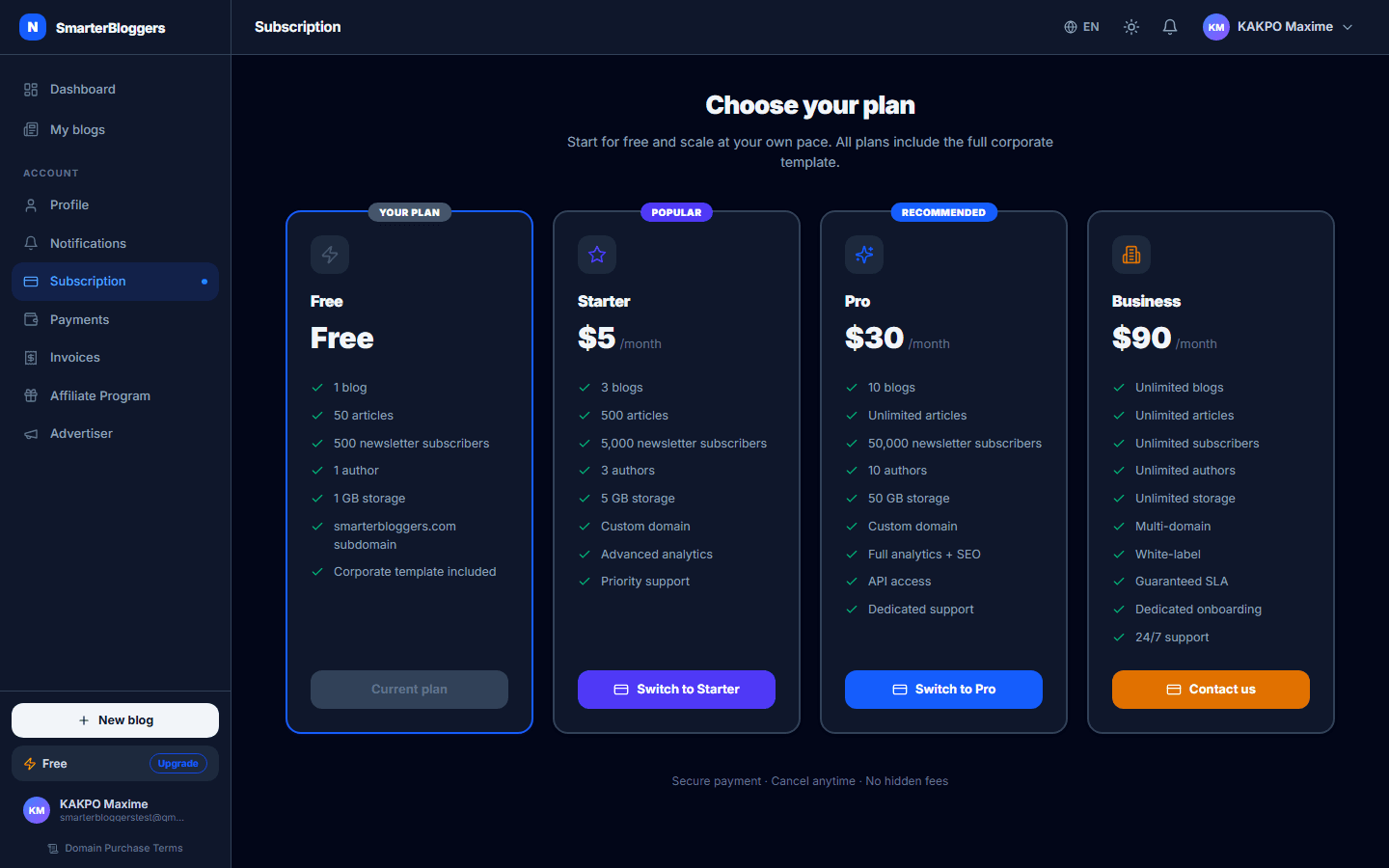
Our platform offers four distinct subscription plans: Free, Starter, Pro, and Business. Each plan is tailored to different needs:
- Free: Basic access with limited features.
- Starter: Priced at $5/month, offering additional features.
- Pro: Priced at $30/month, suitable for growing needs.
- Business: Priced at $90/month, designed for extensive use.
You can view the features of each plan on the subscription page. The current plan is highlighted, and you can upgrade or downgrade as needed.
- Choose a plan that aligns with your current needs and future growth.
Subscription Checkout
To upgrade your plan, navigate to the subscription page and select the desired plan. Click the 'Upgrade Now' button to initiate the checkout process. Payments are processed through NowPayments, using USDT on the Binance Smart Chain (BSC). You will receive a deposit address and a QR code for payment. Ensure that you complete the payment within the specified time window.
- Ensure you have sufficient USDT in your wallet before starting the checkout process.
Payment Confirmation
After completing the payment, the system will automatically confirm the transaction through NowPayments' webhook and polling mechanisms. You will receive a notification once the payment is confirmed, and your plan will be updated accordingly. If you encounter issues, you can retry the payment from the subscription page.
- Keep the payment panel open until confirmation to avoid missing updates.
Managing Transactions
You can view all your transactions, including incoming payments and outgoing payouts, in the 'My Payments' section. This section provides a comprehensive view of all financial activities across all blogs you manage. Transactions are categorized as 'in' for payments received and 'out' for payouts made.
- Regularly check your transaction history to keep track of your expenses and earnings.
Domain Purchase
To purchase a domain, fill out the domain checkout form with the desired domain name, registration period, and registrant information. Ensure you accept the Domain Registration and Purchase Terms & Conditions. The payment process is similar to subscription checkout, using NowPayments.
- Double-check domain availability before proceeding with the purchase.
Payment Status and Resumption
You can check the status of your payments at any time. If a payment is partially paid, you can resume it by sending additional funds to the same deposit address. The system will update the payment status once the full amount is received.
- Ensure that the additional payment covers any shortfall to avoid delays.
Handling Issues
If you encounter any issues during the payment process, such as failed transactions or unconfirmed payments, contact support for assistance. Ensure that your payment details are correct and that you have followed all steps as outlined.
- Keep records of your transactions and communications with support for reference.
What's next?
Explore our advanced features and integrations to enhance your blog's functionality. Check out our guides on content creation and SEO optimization to maximize your blog's potential.