
AI Blog Builder
Effortlessly create a complete blog configuration with AI assistance
Introduction to AI Blog Builder
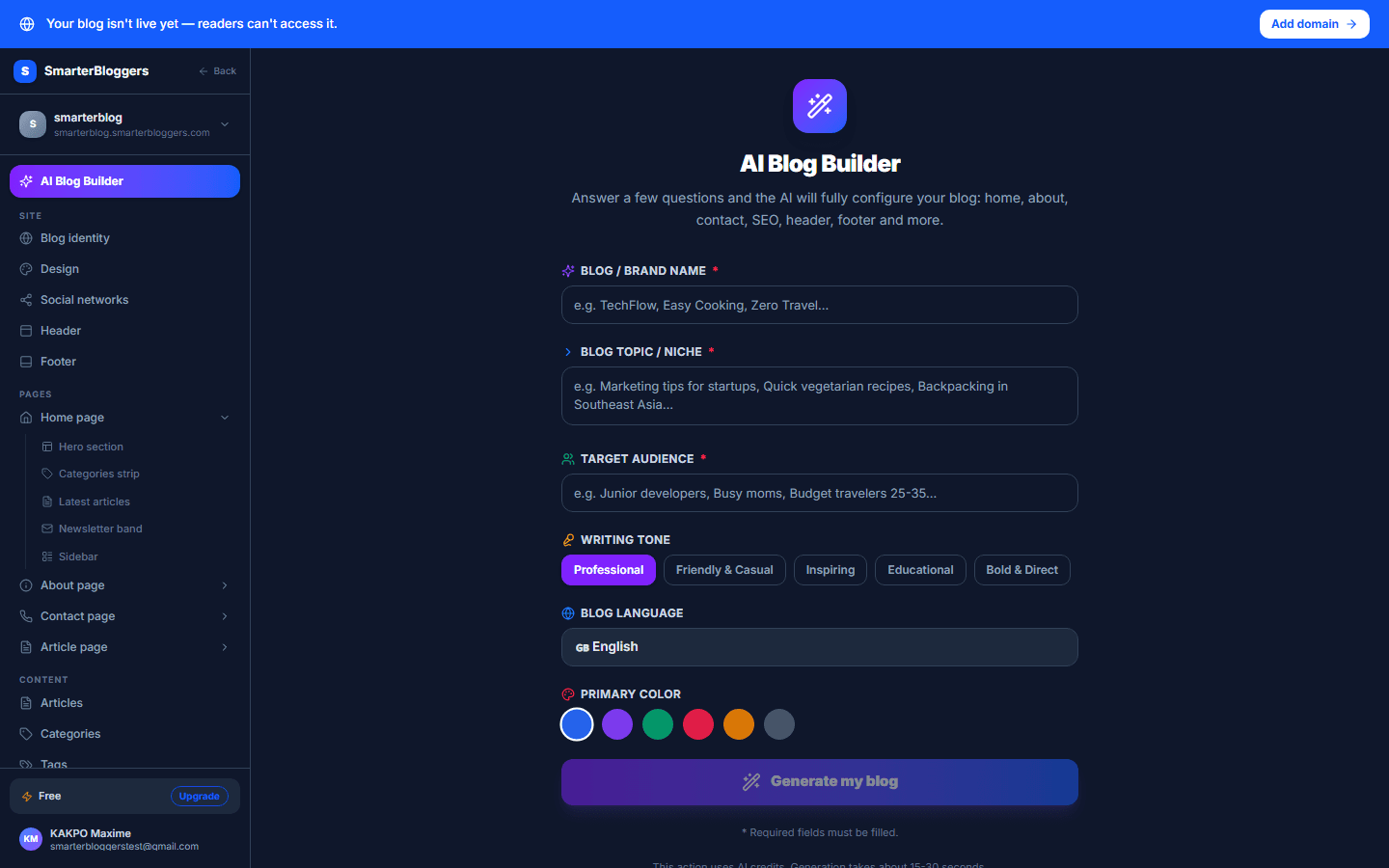
The AI Blog Builder is a powerful tool that allows you to generate a complete blog configuration using AI technologies like OpenAI GPT-4o. This tool helps you set up your blog by generating content and configurations based on your inputs such as niche, audience, tone, language, and brand preferences.
- Ensure you have a clear idea of your blog's niche and target audience before starting.
Plan Limits and Quotas
The AI Blog Builder operates under specific plan limits depending on your subscription level:
- Free Plan: No tokens, text-to-speech characters, or images per month.
- Starter Plan: 50,000 tokens, 10,000 text-to-speech characters, and 5 images per month.
- Pro Plan: 200,000 tokens, 50,000 text-to-speech characters, and 30 images per month.
- Business Plan: 1,000,000 tokens, 200,000 text-to-speech characters, and 100 images per month.
- Enterprise Plan: Unlimited tokens, text-to-speech characters, and images.
These limits are crucial to manage your usage and avoid exceeding your plan's quota.
- Monitor your usage regularly to ensure you stay within your plan's limits.
Generating a Blog Configuration
To generate a blog configuration, follow these steps:
1. Access the AI Blog Builder: Navigate to the AI Blog Builder page in your dashboard. 2. Fill in the Form: Provide the necessary details: - Brand Name: Your blog's brand name. - Niche: The niche or topic of your blog. - Audience: The target audience for your blog. - Tone: Choose from options like professional, friendly, inspiring, educational, or bold. - Language: Select the language for your blog content. - Color Preference: Choose a color that aligns with your brand. 3. Generate Configuration: Click the 'Generate' button to create your blog configuration. The system will process your inputs and generate a configuration tailored to your specifications.
- Ensure all required fields are filled before generating the configuration.
Understanding the Generated Configuration
The generated blog configuration includes several key sections:
- General Settings: Includes the blog name, description, and primary color.
- SEO Settings: Provides a template for SEO titles and meta descriptions.
- Header and Footer: Configures navigation links, social links, and subscription options.
- Home Page: Sets up the hero section, categories, newsletter, and latest articles.
- About and Contact Pages: Includes sections for mission, values, and contact information.
Each section is designed to ensure your blog is well-structured and optimized for your audience.
- Review each section of the configuration to ensure it aligns with your brand's vision.
Handling Errors and Quota Exceedance
If you encounter errors during the generation process, the system will notify you with a descriptive message. Common issues include:
- Plan Limit Exceeded: If you exceed your plan's quota, you will receive a 'Plan Required' error.
- Generation Failure: If the generation process fails for any reason, an error message will guide you on the next steps.
In case of errors, review your plan limits and consider upgrading if necessary.
- Check your plan's quota regularly to avoid unexpected errors.
Finalizing and Applying Your Configuration
Once your blog configuration is successfully generated, you can apply it to your blog:
- Review the Configuration: Ensure all sections are correctly filled and meet your expectations.
- Apply Settings: The system will automatically apply the generated settings to your blog.
- View Your Blog: Use the provided buttons to view your blog's general settings or home page.
This process ensures your blog is ready to go live with a professional and cohesive setup.
- Regularly update your blog's configuration to keep it fresh and aligned with your brand.
What's next?
Now that your blog is configured, explore our guides on content creation and SEO optimization to enhance your blog's performance and reach.