
Managing Your Profile
Comprehensive guide to updating your profile settings and preferences
Accessing Your Profile
To access your profile settings, navigate to the dashboard and click on the 'Profile' tab. This section allows you to view and update your personal information, security settings, and wallet details.
- Ensure you are logged in to access your profile settings.
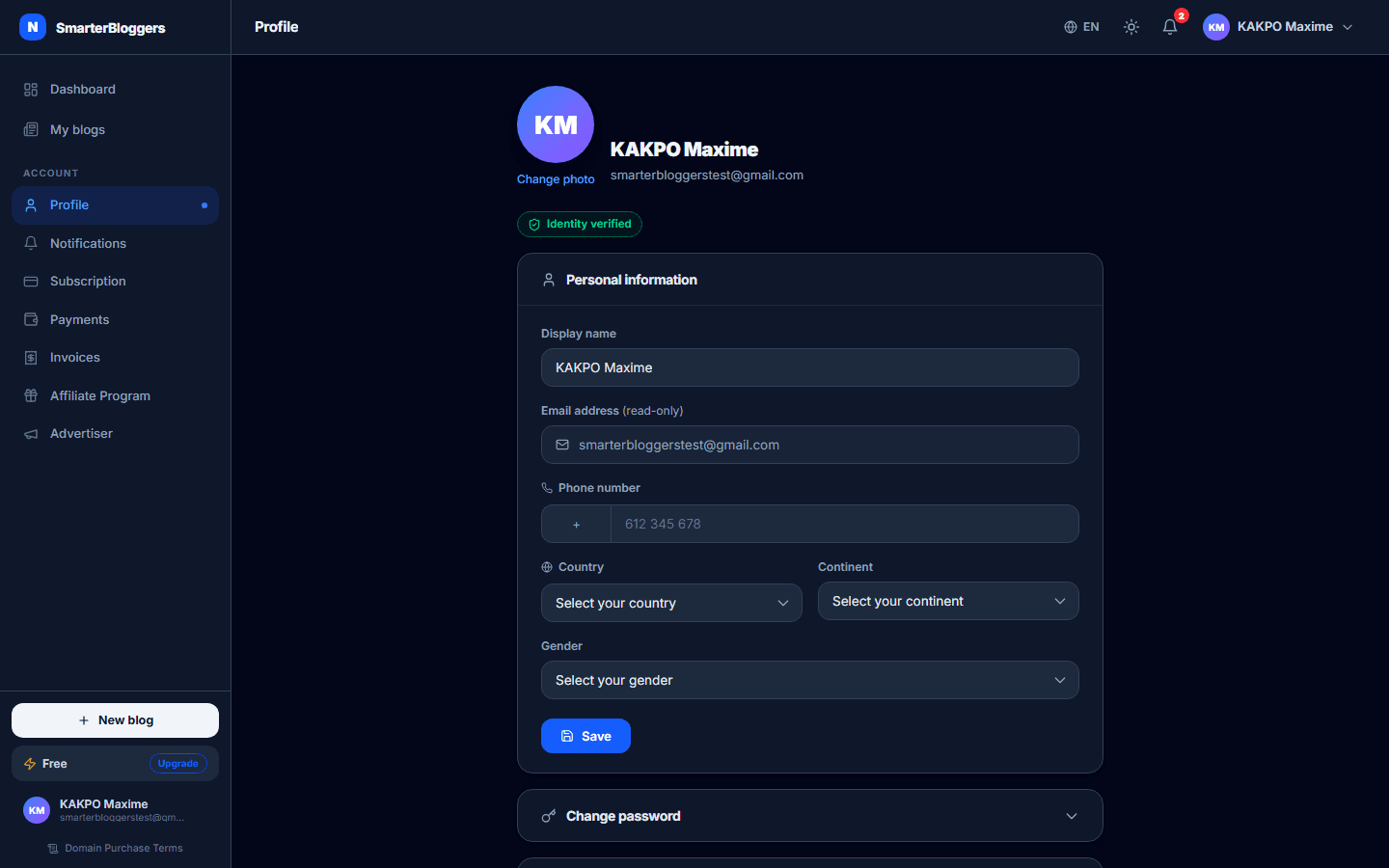
Updating Personal Information
In the 'Personal Information' section, you can update the following details:
- Display Name: Enter your preferred display name.
- Email: Your registered email is displayed here but cannot be changed.
- Phone Number: Enter your phone number. The country code is automatically filled based on your selected country.
- Country and Continent: Select your country and continent from the dropdown menus.
- Gender: Choose your gender from the available options. Note that once set, this cannot be changed.
- Ensure your phone number is correct and includes the country code.
- Your email address is used for account notifications and cannot be changed here.
Changing Your Password
To change your password, expand the 'Change Password' section:
- Enter your current password.
- Enter a new password (minimum 8 characters).
- Confirm your new password.
- Click 'Save' to update your password.
Ensure that your new password is strong and not easily guessable.
- Use a mix of letters, numbers, and symbols for a strong password.
Managing Two-Factor Authentication (2FA)
Enhance your account security by enabling Two-Factor Authentication (2FA):
- Enable 2FA: Click 'Enable 2FA' and follow the instructions to set up 2FA using an authenticator app.
- Disable 2FA: If 2FA is enabled, you can disable it by entering the current 2FA code and confirming the action.
- 2FA adds an extra layer of security to your account.
- Keep your backup codes safe in case you lose access to your authenticator app.
Uploading and Changing Your Avatar
To upload or change your avatar:
- Click on your current avatar or initials.
- Select an image file from your device.
- The image will be uploaded and set as your new avatar.
- Use a clear and professional image for your avatar.
Configuring Wallet and Payout Settings
To manage your wallet settings:
- Click 'Edit Wallet' to add or update your wallet address.
- Select your preferred payout currency from the list.
- Enter your wallet address and any required extra ID.
- Save your changes.
Note: 2FA must be enabled to edit wallet settings.
- Ensure your wallet address is correct to receive payouts.
- Check the currency and network requirements before saving.
What's next?
Explore other settings and features in your dashboard to optimize your account and enhance your blogging experience.