
Understanding Your Payment History
A comprehensive guide to managing and reviewing your payment transactions on our platform
Accessing Your Payment History
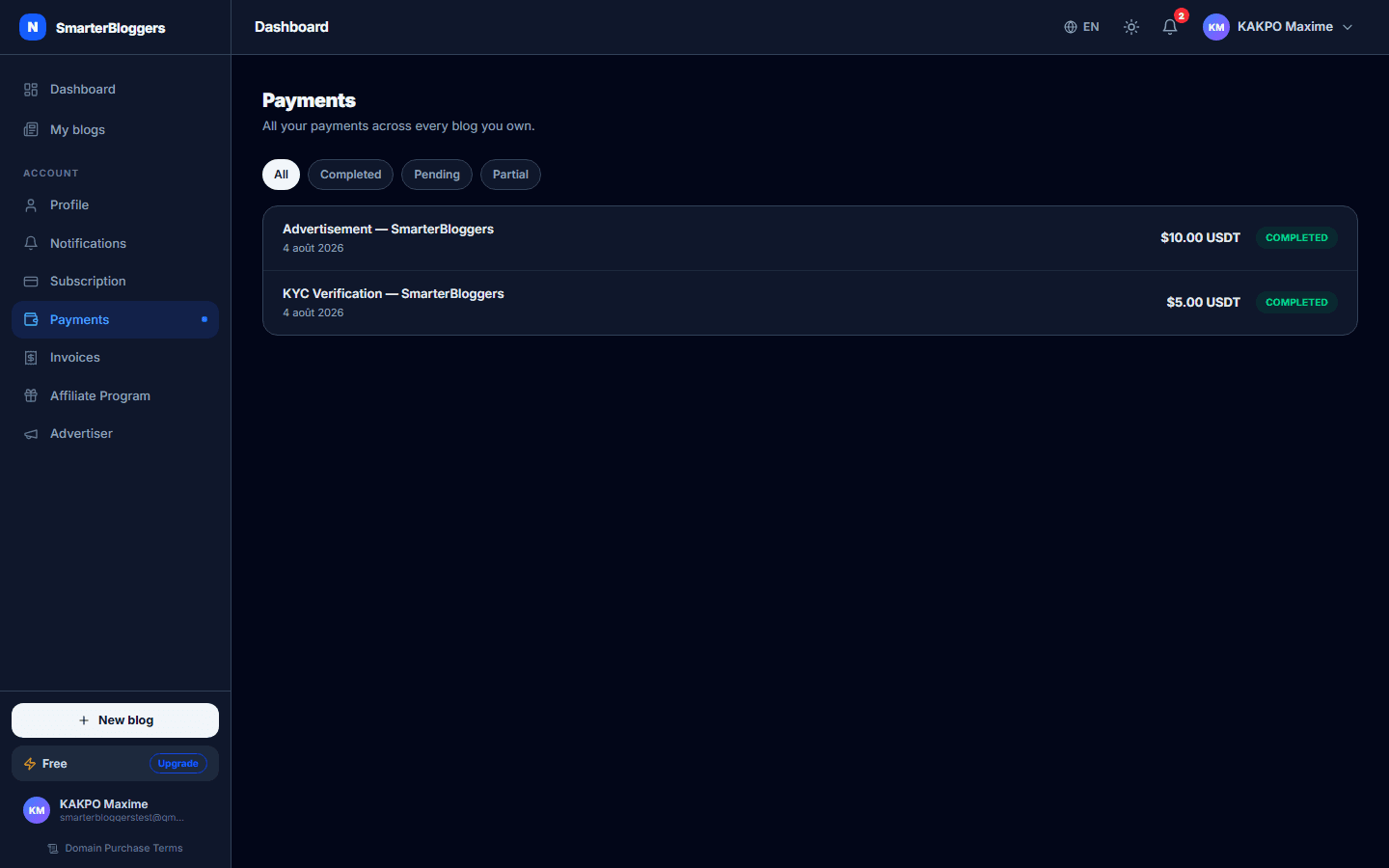
To view your payment history, navigate to the 'Payments' section of your dashboard. This section provides a comprehensive view of all your transactions, including payments made for subscriptions, articles, domains, and more. You can filter transactions by status: all, completed, pending, or partially paid.
- Use filters to quickly find specific transactions.
- Ensure you are logged in to access your payment history.
Payment Details and Statuses
Each transaction in your payment history includes detailed information such as the transaction type (e.g., subscription, article purchase), status (e.g., completed, pending), amount, currency, and the date of the transaction. The status of each transaction is color-coded for easy identification:
- Completed: The payment has been successfully processed.
- Pending: The payment is awaiting confirmation.
- Partially Paid: The payment has been partially received, and additional funds are required.
- Failed: The payment could not be processed.
You can click on each transaction to view more details.
- Hover over status labels for more information.
- Check the transaction date to verify the timeline of your payments.
Resuming a Partially Paid Transaction
If a transaction is marked as 'Partially Paid', you can resume the payment process to complete it. Click the 'Resume' button next to the transaction. This will reopen the payment panel, allowing you to send the remaining amount to the same address. The platform will continue to monitor the payment status until it is fully paid.
- Ensure you have the correct amount ready before resuming a payment.
- Contact support if you encounter issues while resuming a payment.
Understanding Payment Methods
Currently, payments are processed through NowPayments using USDT on the Binance Smart Chain (BSC) network. This method provides a secure and efficient way to handle transactions without redirection to external payment gateways. The platform generates a deposit address and a QR code for each transaction, which you can use to complete the payment.
- Ensure your wallet supports USDT on the BSC network.
- Double-check the deposit address before sending funds.
Managing Subscriptions
Subscriptions can be managed directly from the payment history. When you subscribe to a plan, a transaction is created with details about the plan and billing cycle (monthly or annual). You can view the current status of your subscription and the end date of the current billing period. If you need to change your subscription plan, you can do so through the subscription management section.
- Review your subscription details regularly to avoid unexpected charges.
- Contact support if you need assistance with subscription changes.
Handling Domain Purchases
Domain purchases are processed similarly to other transactions. You must agree to the Domain Registration and Purchase Terms & Conditions before proceeding. Once the payment is confirmed, the domain registration is completed. You can view the status of your domain purchase in your payment history.
- Ensure the domain name is correctly entered before purchasing.
- Check the availability of the domain before proceeding with the payment.
Viewing and Downloading Invoices
Invoices for completed transactions are automatically generated and can be accessed from your payment history. These invoices provide a detailed breakdown of the transaction, including the amount paid, platform fees, and net amount. You can download these invoices for your records.
- Keep copies of your invoices for tax and accounting purposes.
- Contact support if you need a reissue of an invoice.
What's next?
Now that you understand your payment history, explore other features like managing subscriptions and domain purchases. Check out our guides on setting up your blog and optimizing your content for better engagement.