
Advertising on SmarterBloggers.com
Comprehensive guide to managing your ads on SmarterBloggers
Submitting an Ad
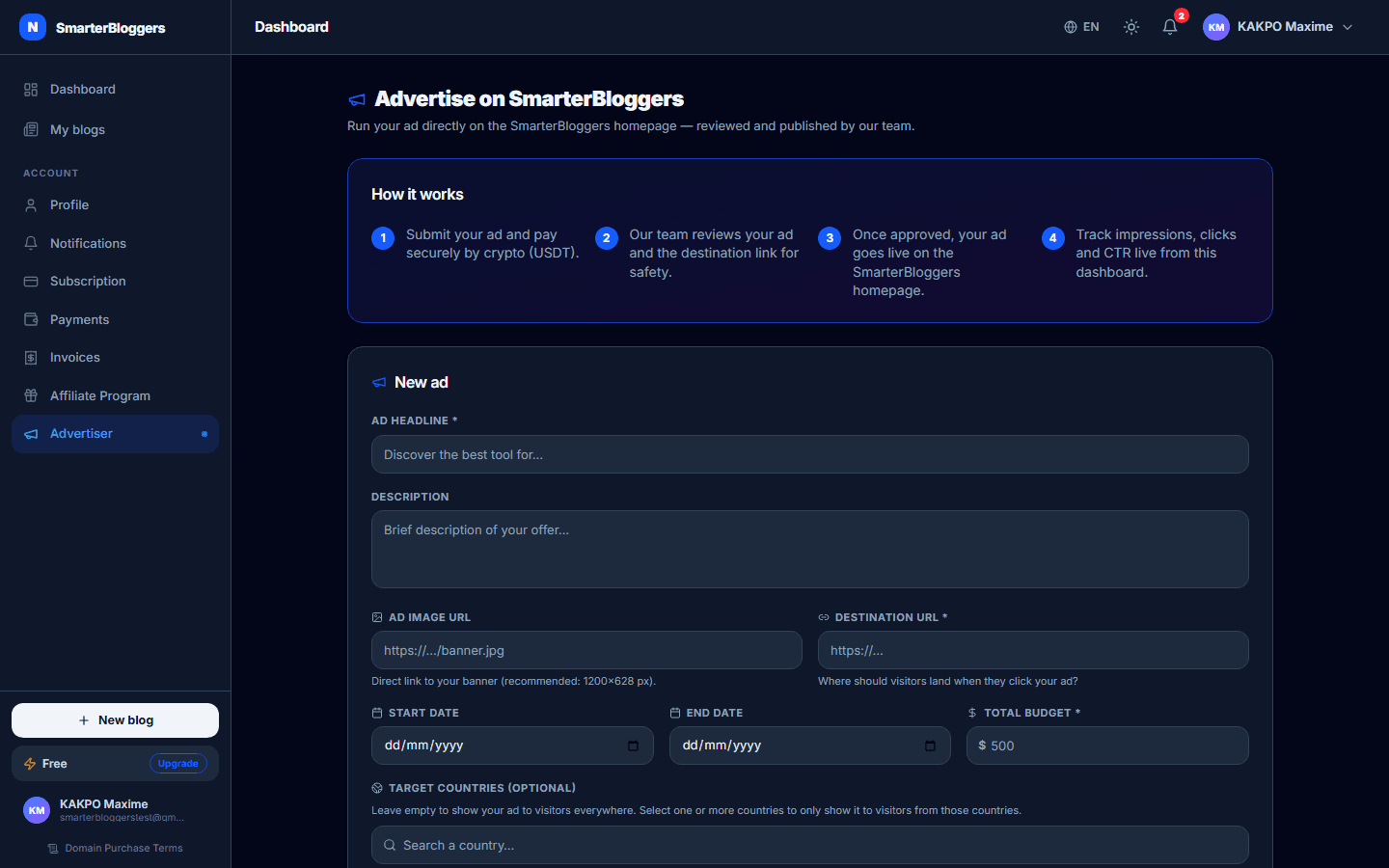
To submit an ad on SmarterBloggers, you need to provide several details:
- Advertiser Name: Your name or your company's name.
- Advertiser Email: Your contact email.
- Title: A brief title for your ad (max 80 characters).
- Description: An optional description of your ad (max 200 characters).
- Image URL: A URL to the image you want to use in your ad.
- Click URL: The URL users will be directed to when they click your ad.
- Total Budget: The total amount you are willing to spend on the ad. This must be at least the minimum budget set by the platform.
Once you have filled out these details, the ad submission process involves payment through NowPayments. A QR code and payment address will be generated for you to complete the transaction.
- Ensure your total budget meets the minimum requirement set by the platform.
- Double-check your URLs to ensure they are correct and functional.
Managing Your Ads
After submitting your ad, you can manage it through the 'My Ads' section. Here, you can view all your ads, their statuses, and performance metrics. Each ad will display:
- Title and Description: As provided during submission.
- Click URL: The destination URL for the ad.
- Submission Status: This can be 'Pending', 'Approved', 'Rejected', or 'Payment Pending'.
- Campaign Status: Indicates if the ad is 'Active', 'Paused', or 'Expired'.
You can also pause or resume your ads as needed, but note that ads with dangerous links cannot be resumed.
- Regularly check the status of your ads to ensure they are running as expected.
- Use the 'Pause' feature to temporarily stop an ad without deleting it.
Ad Performance and Statistics
You can view detailed statistics for your approved ads. The statistics include:
- Total Impressions: The number of times your ad was displayed.
- Total Clicks: The number of times users clicked on your ad.
- Click-Through Rate (CTR): The percentage of impressions that resulted in clicks.
- Amount Paid: The total amount spent on the ad.
Additionally, a daily trend chart is available to visualize the performance over time. This data helps you assess the effectiveness of your ad campaigns.
- Monitor your CTR to gauge the effectiveness of your ad.
- Adjust your ad content or budget based on performance insights.
Platform Ads vs. Blog Ads
SmarterBloggers allows you to submit ads on the main platform or on individual blogs. Platform ads are managed directly through your account, while blog ads can be submitted without authentication. For platform ads, your account details are automatically used to fill in advertiser information, ensuring authenticity and preventing impersonation.
- Use platform ads for broader reach across SmarterBloggers.
- Ensure your account details are up-to-date for accurate ad submissions.
Revenue Sharing and Commissions
Revenue from ads is distributed based on the type of ad:
- Platform Ads: 10% goes to the first-level affiliate, 1% each to levels 2-10, and the remaining 81% stays with the platform.
- Blog Ads: 60% goes to the blog owner, 10% to affiliates, and 30% to the platform.
For example, if an ad costs $100, a platform ad would distribute $10 to the first-level affiliate, $1 each to levels 2-10, and $81 to the platform. A blog ad would distribute $60 to the blog owner, $10 to affiliates, and $30 to the platform.
- Ensure your affiliate network is active to maximize commission opportunities.
- Keep track of your ad spending to understand revenue distribution.
Security and Compliance
All ads undergo a security scan to ensure the safety of the click URL. Ads flagged as dangerous cannot be approved or resumed. Additionally, ads are reviewed by AI for content compliance, and only those marked as safe and compliant are automatically approved. Manual review is available for ads that do not pass AI checks.
- Ensure your click URL is safe and secure to avoid rejection.
- Review AI feedback to improve ad content if flagged.
What's next?
Now that you understand how to manage your ads on SmarterBloggers, explore our guides on optimizing ad content and targeting the right audience to enhance your campaign performance.